The Live API
Attribution: Content copied and adapted from Adam Murray’s “JS in Live” tutorials, licensed under CC BY-NC-SA 4.0. Original: https://adammurray.link/max-for-live/js-in-live/ — Changes may be present. Not endorsed by Adam Murray or Cycling ‘74. License: https://creativecommons.org/licenses/by-nc-sa/4.0/
[!TIP] A new version of this tutorial is available that uses the
v8JavaScript engine in Max 9 (Live 12.2+), which is far superior to the legacyjsobject used here.
This is a follow-up to the “The Max Console” tutorial. Start with another new Max MIDI Effect device, as explained in “Getting Started”.
In this tutorial we’ll learn how to access the different Live objects available to the Live API, how to examine their properties and child objects, and how to make changes to the objects. In the next tutorial, we’ll use this knowledge to generate MIDI clips.
Setup
First paste in the log() function from the previous tutorial. Assume it’s at the top of all code examples.
function log() {
  for (var i = 0; i < arguments.length; i++) {
    var s = String(arguments[i]);
    post(s.indexOf("[object ") >= 0 ? JSON.stringify(arguments[i]) : s);
  }
  post("\n");
}
log("----------------------------------------------------------------");
log("Reloaded on", Date());
Create a LiveAPI and inspect:
var liveObject = new LiveAPI();

log("path:", liveObject.path);
log("id:", liveObject.id);
log("children:", liveObject.children);
log(liveObject.info);
Example output:
path:
id:  0
children:  this_device,control_surfaces,live_app,live_set
"No object"
We need to connect to an actual object by providing a path:
var liveObject = new LiveAPI("live_set master_track");

log("path:", liveObject.path);
log("id:", liveObject.id);
log("children:", liveObject.children);
Example:
path:  "live_set master_track"
id:  21
children:  canonical_parent,clip_slots,devices,group_track,mixer_device,view
Live Paths
Use the Live Object Model diagram to build paths by starting from a root (live_app, live_set, control_surfaces, this_device) and following arrows. Paths are space-separated.
A more complex path:
var path = "live_set master_track mixer_device volume";
var liveObject = new LiveAPI(path);

log("path:", liveObject.path);
log("id:", liveObject.id);
log("children:", liveObject.children);
Example:
path:  "live_set master_track mixer_device volume"
id:  2
children:  canonical_parent
canonical_parent points back to the parent via canonical relations.
Live Objects
Access objects via paths and explore info:
var liveObject = new LiveAPI("live_set");
log(liveObject.info);
Truncated example output:
id 3
type Song
description This class represents a Live set.
children cue_points CuePoint
children return_tracks Track
children scenes Scene
children tracks Track
children visible_tracks Track
child groove_pool GroovePool
child master_track Track
child view View
property tempo float
...
function start_playing
function stop_playing
...
done
Info includes general details, children (single and lists), properties (with access), and functions.
Live Object Children
Children correspond to paths. Determine children via the model or via children/info:
log(liveObject.children);
log(liveObject.info);
Children lists require an index (0-based):
// first track
new LiveAPI("live_set tracks 0");

// second track
new LiveAPI("live_set tracks 1");

// second clip slot in third track
new LiveAPI("live_set tracks 2 clip_slots 1");

// first control surface
new LiveAPI("control_surfaces 0");
Live Object Properties
Read and set properties:
var api = new LiveAPI("live_set");
log("tempo:", api.get("tempo"));

api.set("tempo", 80);
Not all properties are settable; check ACCESS in the docs (get, observe, set).
Observe property changes by passing a callback to the constructor and setting property:
function onChange(list) { // [property, value]
  var property = list[0];
  var value = list[1];
  log("property", property, "is", value);
}

var api = new LiveAPI(onChange, "live_set");
api.property = "tempo"; // subscribe

api.set("tempo", 110);
api.set("tempo", 130);
The object’s id is also reported; filter as needed.
Live Object Functions
Trigger behaviors with call():
var api = new LiveAPI("live_set");
api.call("start_playing");
GUI-triggerable actions often have matching functions. Some are not undoable (like transport start).
this_device
Special path for the Max for Live device containing the JS:
var api = new LiveAPI("this_device");
log("current device path:", api.path);

api = new LiveAPI("this_device canonical_parent");
log("device parent:", api.path);
Example:
current device path:  "live_set tracks 0 devices 0"
device parent:  "live_set tracks 0"
Safely Constructing a LiveAPI Object
Some of this tutorial used top-level code in js for exploration. In real devices, avoid constructing LiveAPI at top-level during device initialization. You may see errors like:
The Max function “SendMessage” returned with error 2: Bad parameter value.
Live API is not initialized, use live.thisdevice to determine when initialization is complete
Correct approach: trigger your code after initialization via live.thisdevice or a UI control like live.button, and wrap your logic in bang().
Example tempo randomizer using both automatic and manual triggers:
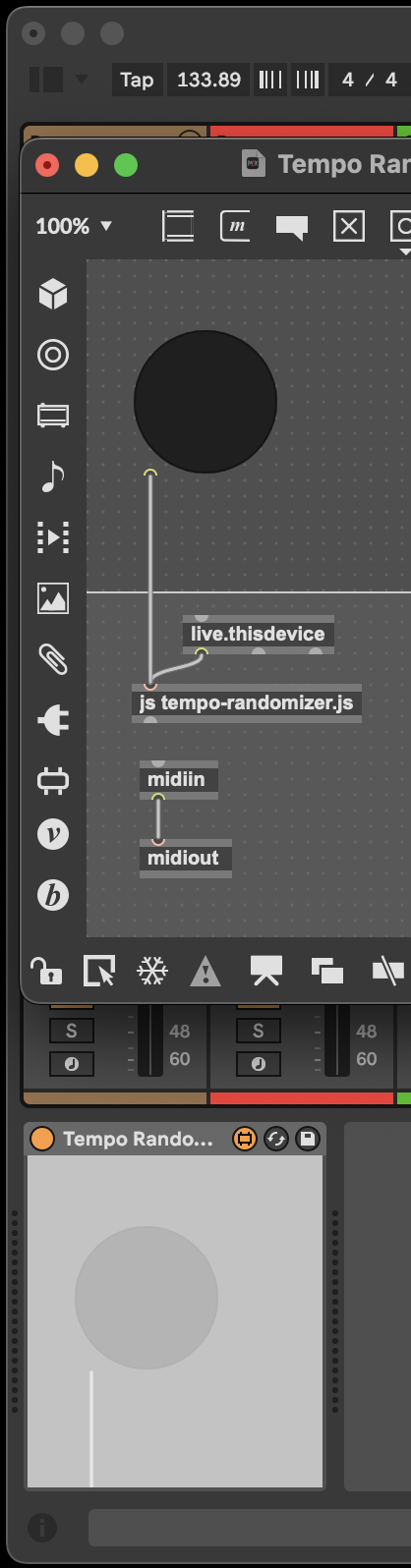
function bang() {
  var randomTempo = 80 + 60 * Math.random();
  var api = new LiveAPI("live_set");
  api.set("tempo", randomTempo);
}
Now saving/closing the patch and re-adding the device behaves correctly, without initialization errors.
Live API Documentation
Max documentation resources:
- The LiveAPI Object (JavaScript interface)
- Creating Devices that use the Live API (focuses on Max objects; concepts carry over)
- The Live Object Model (comprehensive reference)
Next Steps
The “Generating MIDI Clips” tutorial covers how to algorithmically generate notes into a MIDI clip using the Live API.
Have feedback or questions? Email the developer: adam@adammurray.link (check spam for replies)