Real Time MIDI Processing
Attribution: Content copied and adapted from Adam Murray’s “JS in Live” tutorials, licensed under CC BY-NC-SA 4.0. Original: https://adammurray.link/max-for-live/js-in-live/ — Changes may be present. Not endorsed by Adam Murray or Cycling ‘74. License: https://creativecommons.org/licenses/by-nc-sa/4.0/
[!TIP] A new version of this tutorial is available that uses the
v8JavaScript engine in Max 9 (Live 12.2+), which is far superior to the legacyjsobject used here.
This tutorial builds on the setup from “Getting Started.” You should be comfortable creating Max for Live devices with js objects. Before diving into debugging with the Max Console and the Live API, we’ll build a simple real-time MIDI processor.
We will alter MIDI in real time by changing the pitch based on simple rules. You can play a MIDI clip in Live or a hardware controller, and JavaScript will change the pitches on the fly.
Here’s the idea, unimaginatively called octave-switcher.js:
- The first time a pitch repeats between consecutive notes, play it one octave up.
- The second time in a row, play it one octave down.
- The third time, reset to the original octave.
- Then repeat: normal → up → down → normal → …
- Whenever the pitch changes, the state resets to normal.
For example, starting with this MIDI clip:
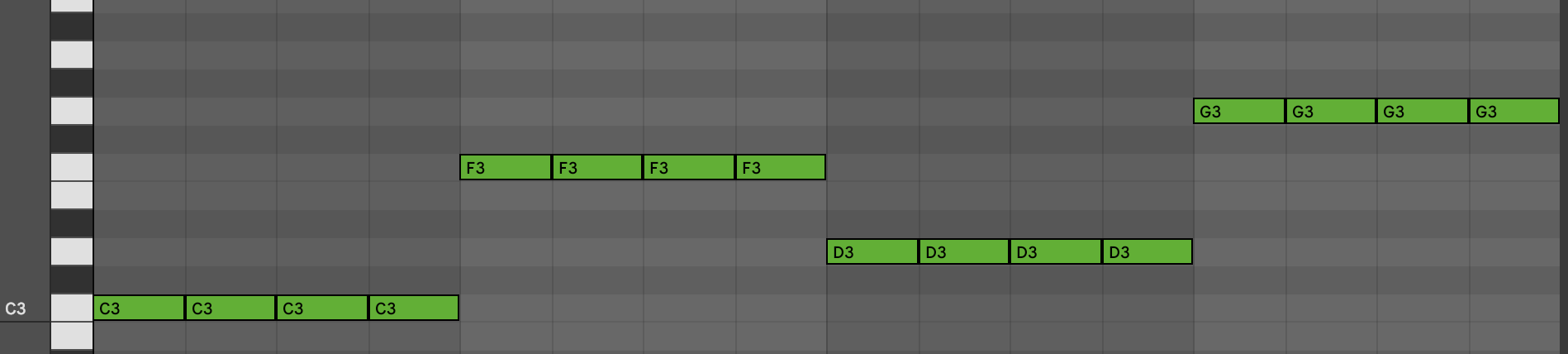
After our JavaScript processes it:
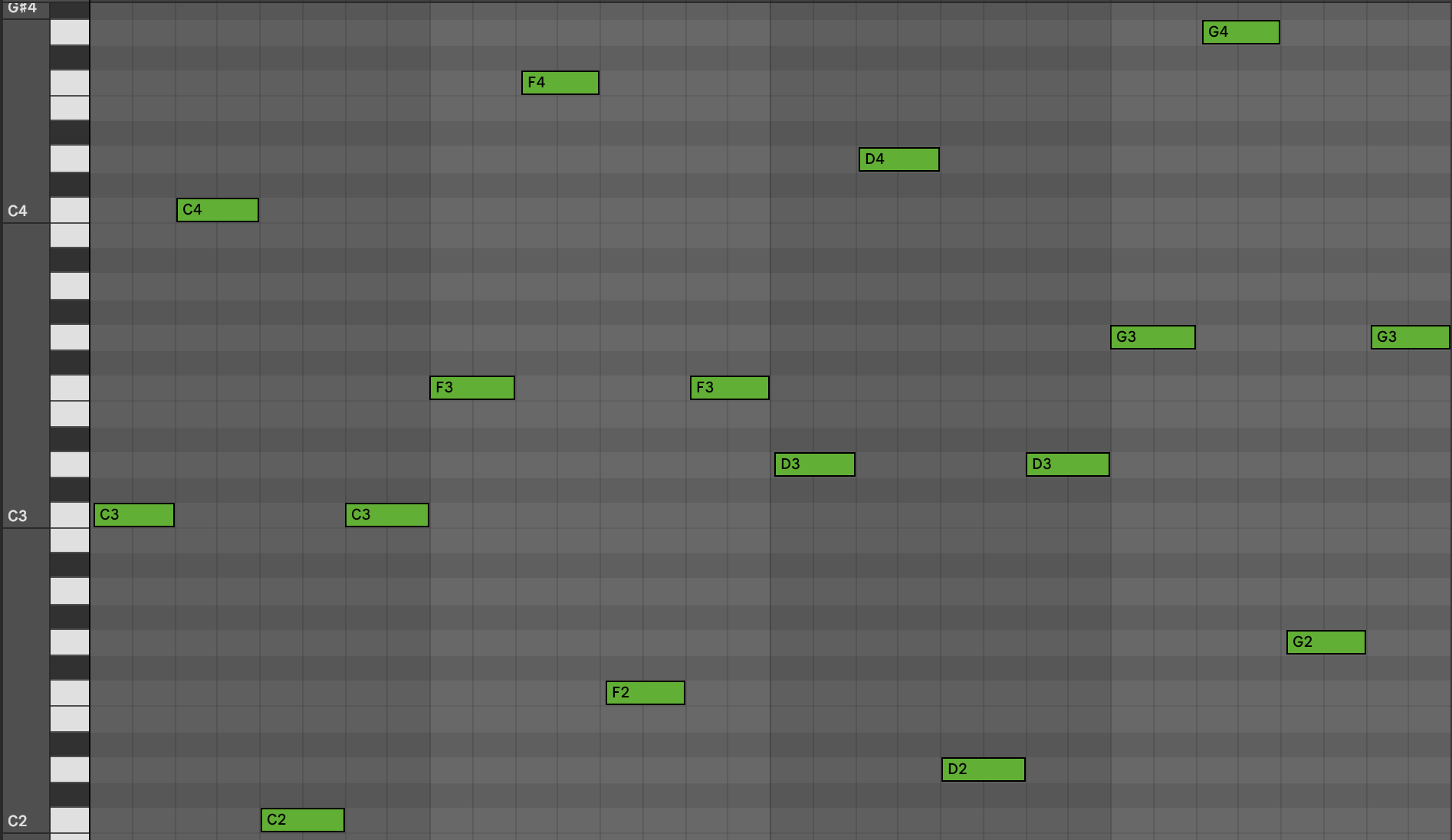
Notice the slight delay. Real-time processing adds latency. Editing the device in Max increases latency further. If latency is too high while editing, save and close the Max editor and test the device directly in Live.
Real Time Note Events
MIDI note events have a pitch and a velocity. There are two main types:
- “note on” (starts a note)
- “note off” (ends a note)
In Live’s piano roll, the left edge of a note is “note on” and the right edge is “note off.”
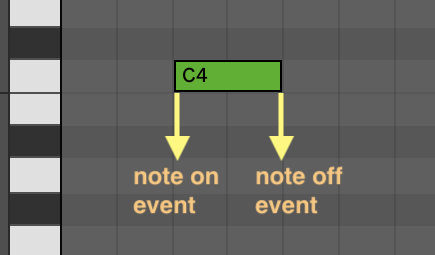
Our JavaScript sees a separate “note on” and “note off” for every note. In real time, there is no start time or duration. For “note on” events, we don’t yet know the duration—the corresponding “note off” hasn’t arrived.
By convention: velocity == 0 → “note off”, velocity > 0 → “note on”. Ignore negative values.
Intercepting MIDI Note Events
A fresh Max MIDI Effect device passes MIDI through from midiin → midiout:
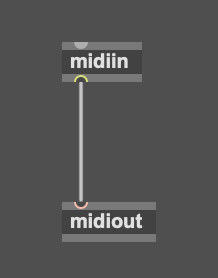
To intercept note events while passing everything else, split the stream with midiparse and recombine with midiformat, then midiout:
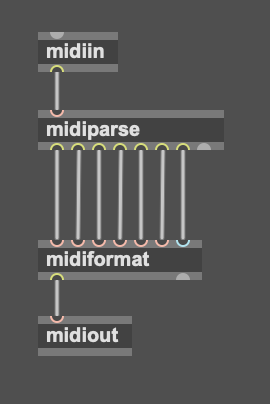
Verify MIDI passes through:
- Save your device (e.g.,
octave-switcher.amxd). - Add a MIDI clip to the track with your device.
- Add notes to the clip.
- Add an instrument (e.g., Drift → “Synthetic Xylophone” works well).
- Play the clip.
You should hear the instrument playing:
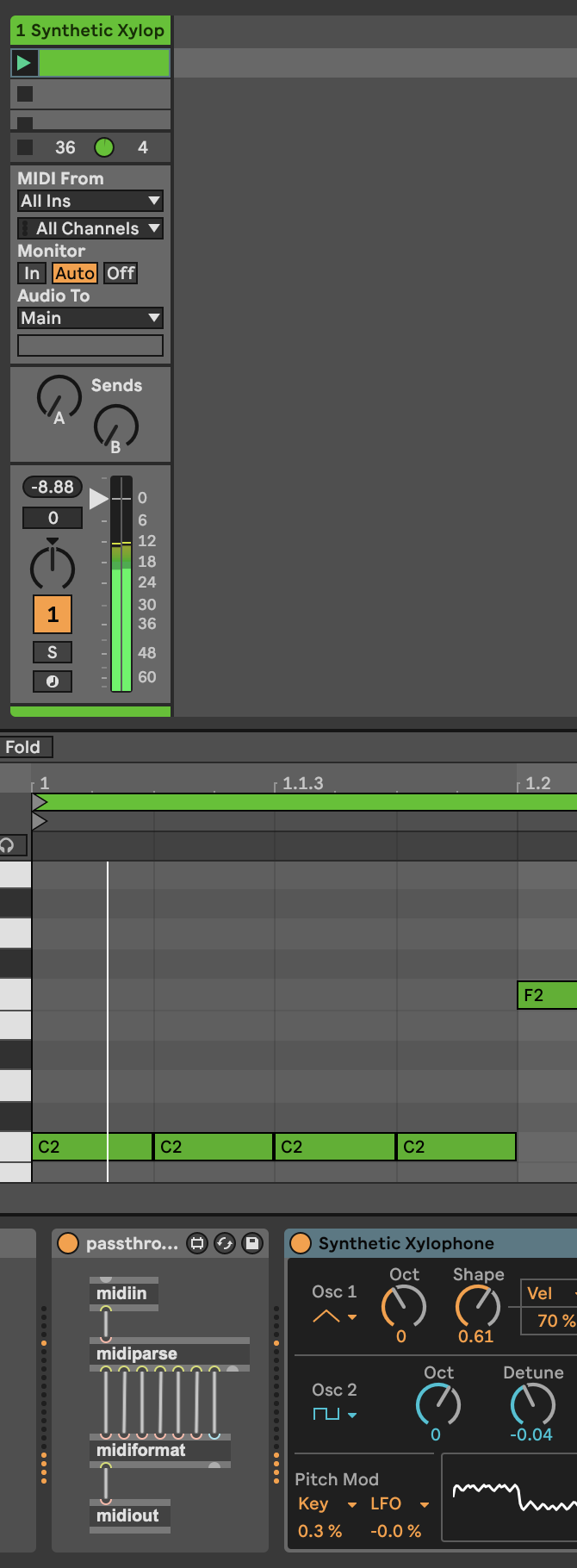
If not, debug before proceeding.
The leftmost outlet of midiparse outputs two-item lists [pitch velocity] for note on/off:
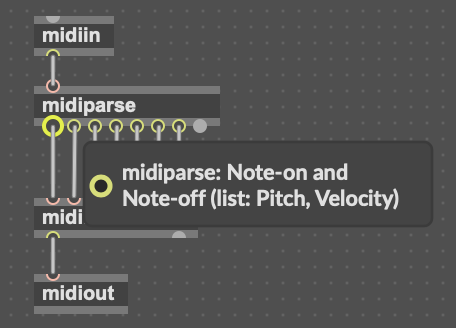
You can inspect this by connecting that outlet to the right inlet of a message box and playing the clip:

Route that outlet into a js object to handle notes in code:
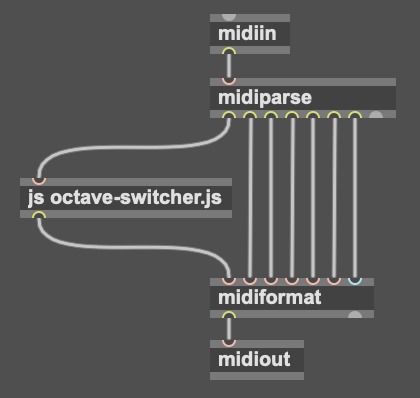
Passing Notes Through js
In js, define a list() handler to receive [pitch velocity] and pass it through:
function list() {
  var pitch = arguments[0];
  var velocity = arguments[1];

  post("pitch=" + pitch + ", velocity=" + velocity + "\n");
  outlet(0, pitch, velocity);
}
Example console output:
pitch=60, velocity=100
pitch=60, velocity=0
pitch=60, velocity=100
pitch=60, velocity=0
pitch=65, velocity=100
pitch=65, velocity=0
pitch=65, velocity=100
Detecting Note On Events and Repeated Pitches
Velocity > 0 is “note on”; velocity == 0 is “note off”:
function list() {
  var pitch = arguments[0];
  var velocity = arguments[1];

  if (velocity > 0) {
    post("Note on\n");
  } else {
    post("Note off\n");
  }

  post("pitch=" + pitch + ", velocity=" + velocity + "\n");
  outlet(0, pitch, velocity);
}
Track repeated pitches by remembering the previous pitch across calls:
var previousPitch = null;

function list() {
  var pitch = arguments[0];
  var velocity = arguments[1];

  if (velocity > 0) {
    post("Note on\n");
    if (pitch == previousPitch) {
      post("Repeat pitch: " + pitch + "\n");
    }
  } else {
    post("Note off\n");
  }

  post("pitch=" + pitch + ", velocity=" + velocity + "\n");
  outlet(0, pitch, velocity);
  previousPitch = pitch;
}
Example logs:
Note on
pitch=60, velocity=100
Note off
pitch=60, velocity=0
Note on
Repeat pitch: 60
pitch=60, velocity=100
Cycling Octave States
Define constants and a state that cycles on repeat pitches:
var PASS_THROUGH = 0;
var OCTAVE_UP = 1;
var OCTAVE_DOWN = 2;

var state = PASS_THROUGH;
var previousPitch = null;

function list() {
  var pitch = arguments[0];
  var velocity = arguments[1];

  if (velocity > 0) {
    post("Note on\n");
    if (pitch == previousPitch) {
      if (state == PASS_THROUGH) state = OCTAVE_UP;
      else if (state == OCTAVE_UP) state = OCTAVE_DOWN;
      else state = PASS_THROUGH;
      post("Repeat pitch " + pitch + ", state → " + state + "\n");
    }
  } else {
    post("Note off\n");
  }

  post("pitch=" + pitch + ", velocity=" + velocity + "\n");
  outlet(0, pitch, velocity);
  previousPitch = pitch;
}
Example logs:
Note on
pitch=60, velocity=100
Note on
Repeat pitch 60, state → 1
Note on
Repeat pitch 60, state → 2
Note on
Repeat pitch 60, state → 0
Now actually shift octaves on “note on”:
var PASS_THROUGH = 0;
var OCTAVE_UP = 1;
var OCTAVE_DOWN = 2;

var state = PASS_THROUGH;
var previousPitch = null;

function list() {
  var pitch = arguments[0];
  var velocity = arguments[1];

  if (velocity > 0) {
    if (pitch == previousPitch) {
      if (state == PASS_THROUGH) state = OCTAVE_UP;
      else if (state == OCTAVE_UP) state = OCTAVE_DOWN;
      else state = PASS_THROUGH;
    }

    if (state == OCTAVE_UP) pitch += 12;
    else if (state == OCTAVE_DOWN) pitch -= 12;
  }

  outlet(0, pitch, velocity);
  previousPitch = pitch;
}
Handling Note Off Events
“note off” events must end the note that started on the modified pitch. Track mappings from original pitch → modified pitch, then apply the same mapping to the corresponding “note off”, and clear it:
var noteOffMap = {};

function list() {
  var pitch = arguments[0];
  var originalPitch = pitch;
  var velocity = arguments[1];

  if (velocity > 0) { // note on
    if (pitch == previousPitch) {
      if (state == PASS_THROUGH) state = OCTAVE_UP;
      else if (state == OCTAVE_UP) state = OCTAVE_DOWN;
      else state = PASS_THROUGH;
    } else {
      state = PASS_THROUGH; // reset on pitch change
    }

if (state == OCTAVE_UP) pitch += 12;
else if (state == OCTAVE_DOWN) pitch -= 12;

if (pitch != originalPitch) {
  noteOffMap[originalPitch] = pitch;
}
  } else { // note off
  var modifiedPitch = noteOffMap[originalPitch];
  if (modifiedPitch != null) {
    pitch = modifiedPitch;
      noteOffMap[originalPitch] = null;
    }
  }

  outlet(0, pitch, velocity);
  previousPitch = originalPitch; // use input pitch for repeat detection
}
To visualize changes in logs, you can print transformations like 60 → 72.
Wrapping Up
Final octave-switcher.js (cleaned up):
var PASS_THROUGH = 0;
var OCTAVE_UP = 1;
var OCTAVE_DOWN = 2;

var state = PASS_THROUGH;
var previousPitch = null;
var noteOffMap = {};

function list() {
  var pitch = arguments[0];
  var originalPitch = pitch;
  var velocity = arguments[1];

  if (velocity > 0) { // handle note on
    if (pitch == previousPitch) { // cycle state for repeated pitch
      if (state == PASS_THROUGH) state = OCTAVE_UP;
      else if (state == OCTAVE_UP) state = OCTAVE_DOWN;
      else state = PASS_THROUGH;
    } else { // reset on changed pitch
      state = PASS_THROUGH;
    }

    if (state == OCTAVE_UP) pitch += 12;
    else if (state == OCTAVE_DOWN) pitch -= 12;

    if (pitch != originalPitch) {
      noteOffMap[originalPitch] = pitch;
    }
  } else { // handle note off
    var modifiedPitch = noteOffMap[originalPitch];
    if (modifiedPitch != null) {
      pitch = modifiedPitch;
      noteOffMap[originalPitch] = null;
    }
  }

  outlet(0, pitch, velocity);
  previousPitch = originalPitch;
}
Next steps
The next tutorial, “The Max Console,” shows how to better use post() and the Max console to inspect and debug JavaScript in Max for Live. Tired of ending every post() with "\n"? Read on!
Have feedback or questions? Email the developer: adam@adammurray.link (check spam for replies)